Model Metadata
When you register a model, you can add metadata to help with the documentation of the model. Service defined metadata fields are known as Taxonomy Metadata and user defined metadata fields are known as Custom Metadata
Taxonomy Metadata
Taxonomy metadata includes the type of the model, use case type, libraries, framework, and so on. This metadata provides a way of documenting the schema of the model. The UseCaseType, FrameWork, FrameWorkVersion, Algorithm, and Hyperparameters are fixed taxonomy metadata. These fields are automatically populated when the .prepare() method is called. You can also manually update the values of those fields.
ads.common.model_metadata.UseCaseType: The machine learning problem associated with the Estimator class. TheUseCaseType.values()method returns the most current list. This is a list of allowed values.:UseCaseType.ANOMALY_DETECTIONUseCaseType.BINARY_CLASSIFICATIONUseCaseType.CLUSTERINGUseCaseType.DIMENSIONALITY_REDUCTIONUseCaseType.IMAGE_CLASSIFICATIONUseCaseType.MULTINOMIAL_CLASSIFICATIONUseCaseType.NERUseCaseType.OBJECT_LOCALIZATIONUseCaseType.OTHERUseCaseType.RECOMMENDERUseCaseType.REGRESSIONUseCaseType.SENTIMENT_ANALYSISUseCaseType.TIME_SERIES_FORECASTINGUseCaseType.TOPIC_MODELING
ads.common.model_metadata.FrameWork: The FrameWork of theestimatorobject. You can get the list of allowed values usingFramework.values():FrameWork.BERTFrameWork.CUMLFrameWork.EMCEEFrameWork.ENSEMBLEFrameWork.FLAIRFrameWork.GENSIMFrameWork.H2OFrameWork.KERASFrameWork.LIGHTgbmFrameWork.MXNETFrameWork.NLTKFrameWork.ORACLE_AUTOMLFrameWork.OTHERFrameWork.PROPHETFrameWork.PYODFrameWork.PYMC3FrameWork.PYSTANFrameWork.PYTORCHFrameWork.SCIKIT_LEARNFrameWork.SKTIMEFrameWork.SPACYFrameWork.STATSMODELSFrameWork.TENSORFLOWFrameWork.TRANSFORMERSFrameWork.WORD2VECFrameWork.XGBOOST
FrameWorkVersion: The framework version of the estimator object. For example,2.3.1.Algorithm: The model class.Hyperparameters: The hyperparameters of the estimator object.
You can’t add or delete any of the fields, or change the key of those fields.
You can populate the use_case_type by passing it in the .prepare() method. Or you can set and update it directly.
import tempfile
from ads.model.framework.sklearn_model import SklearnModel
from sklearn.datasets import load_iris
from sklearn.linear_model import LogisticRegression
from sklearn.model_selection import train_test_split
from ads.common.model_metadata import UseCaseType

# Load dataset and Prepare train and test split
iris = load_iris()
X, y = iris.data, iris.target
X_train, X_test, y_train, y_test = train_test_split(X, y, test_size=0.25)

# Train a LogisticRegression model
sklearn_estimator = LogisticRegression()
sklearn_estimator.fit(X_train, y_train)

# Instantiate ads.model.SklearnModel using the sklearn LogisticRegression model
sklearn_model = SklearnModel(estimator=sklearn_estimator, artifact_dir=tempfile.mkdtemp())

# Autogenerate score.py, pickled model, runtime.yaml, input_schema.json and output_schema.json
sklearn_model.prepare(inference_conda_env="dataexpl_p37_cpu_v3", X_sample=trainx, y_sample=trainy)

sklearn_model.metadata_taxonomy['UseCaseType'].value = UseCaseType.BINARY_CLASSIFICATION
Update metadata_taxonomy
Update any of the taxonomy fields with allowed values:
sklearn_model.metadata_taxonomy['FrameworkVersion'].value = '0.24.2'
sklearn_model.metadata_taxonomy['UseCaseType'].update(value=UseCaseType.BINARY_CLASSIFICATION)
You can view the metadata_taxonomy in the dataframe format by
calling to_dataframe:
sklearn_model.metadata_taxonomy.to_dataframe()
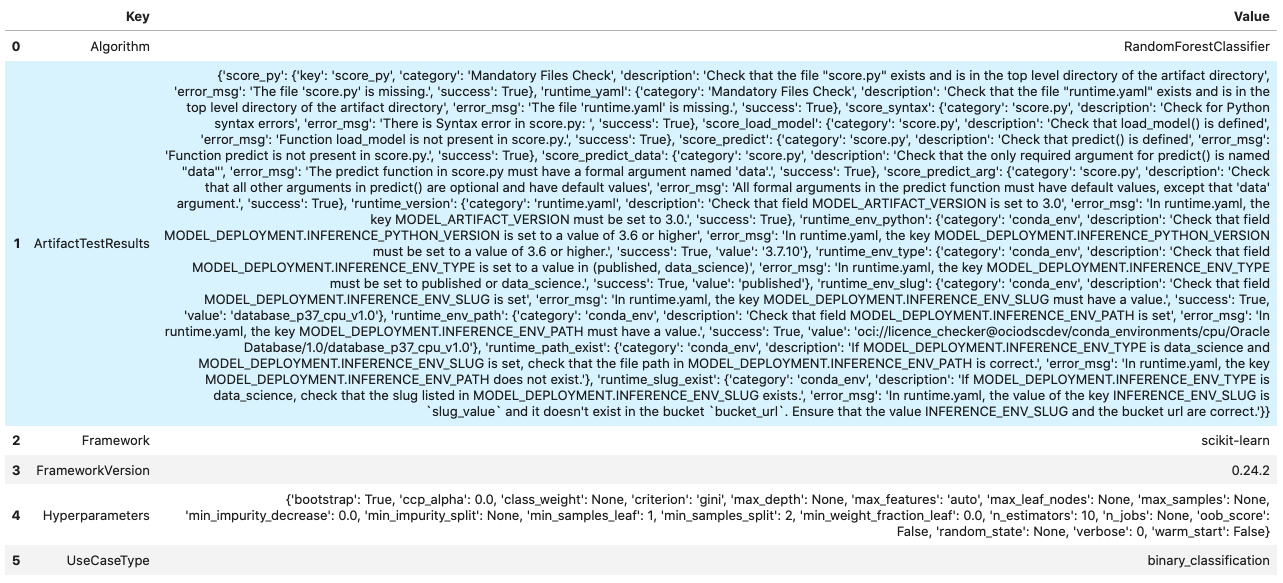
Alternatively, you can view it directly in a YAML format:
sklearn_model.metadata_taxonomy
data:
- key: FrameworkVersion
  value: 0.24.2
- key: ArtifactTestResults
  value:
    runtime_env_path:
      category: conda_env
      description: Check that field MODEL_DEPLOYMENT.INFERENCE_ENV_PATH is set
      error_msg: In runtime.yaml, the key MODEL_DEPLOYMENT.INFERENCE_ENV_PATH must
        have a value.
      success: true
      value: oci://licence_checker@ociodscdev/conda_environments/cpu/Oracle Database/1.0/database_p37_cpu_v1.0
    runtime_env_python:
      category: conda_env
      description: Check that field MODEL_DEPLOYMENT.INFERENCE_PYTHON_VERSION is set
        to a value of 3.6 or higher
      error_msg: In runtime.yaml, the key MODEL_DEPLOYMENT.INFERENCE_PYTHON_VERSION
        must be set to a value of 3.6 or higher.
      success: true
      value: 3.7.10
    runtime_env_slug:
      category: conda_env
      description: Check that field MODEL_DEPLOYMENT.INFERENCE_ENV_SLUG is set
      error_msg: In runtime.yaml, the key MODEL_DEPLOYMENT.INFERENCE_ENV_SLUG must
        have a value.
      success: true
      value: database_p37_cpu_v1.0
    runtime_env_type:
      category: conda_env
      description: Check that field MODEL_DEPLOYMENT.INFERENCE_ENV_TYPE is set to
        a value in (published, data_science)
      error_msg: In runtime.yaml, the key MODEL_DEPLOYMENT.INFERENCE_ENV_TYPE must
        be set to published or data_science.
      success: true
      value: published
    runtime_path_exist:
      category: conda_env
      description: If MODEL_DEPLOYMENT.INFERENCE_ENV_TYPE is data_science and MODEL_DEPLOYMENT.INFERENCE_ENV_SLUG
        is set, check that the file path in MODEL_DEPLOYMENT.INFERENCE_ENV_PATH is
        correct.
      error_msg: In runtime.yaml, the key MODEL_DEPLOYMENT.INFERENCE_ENV_PATH does
        not exist.
    runtime_slug_exist:
      category: conda_env
      description: If MODEL_DEPLOYMENT.INFERENCE_ENV_TYPE is data_science, check that
        the slug listed in MODEL_DEPLOYMENT.INFERENCE_ENV_SLUG exists.
      error_msg: In runtime.yaml, the value of the key INFERENCE_ENV_SLUG is slug_value
        and it doesn't exist in the bucket bucket_url. Ensure that the value INFERENCE_ENV_SLUG
        and the bucket url are correct.
    runtime_version:
      category: runtime.yaml
      description: Check that field MODEL_ARTIFACT_VERSION is set to 3.0
      error_msg: In runtime.yaml, the key MODEL_ARTIFACT_VERSION must be set to 3.0.
      success: true
    runtime_yaml:
      category: Mandatory Files Check
      description: Check that the file "runtime.yaml" exists and is in the top level
        directory of the artifact directory
      error_msg: The file 'runtime.yaml' is missing.
      success: true
    score_load_model:
      category: score.py
      description: Check that load_model() is defined
      error_msg: Function load_model is not present in score.py.
      success: true
    score_predict:
      category: score.py
      description: Check that predict() is defined
      error_msg: Function predict is not present in score.py.
      success: true
    score_predict_arg:
      category: score.py
      description: Check that all other arguments in predict() are optional and have
        default values
      error_msg: All formal arguments in the predict function must have default values,
        except that 'data' argument.
      success: true
    score_predict_data:
      category: score.py
      description: Check that the only required argument for predict() is named "data"
      error_msg: The predict function in score.py must have a formal argument named
        'data'.
      success: true
    score_py:
      category: Mandatory Files Check
      description: Check that the file "score.py" exists and is in the top level directory
        of the artifact directory
      error_msg: The file 'score.py' is missing.
      key: score_py
      success: true
    score_syntax:
      category: score.py
      description: Check for Python syntax errors
      error_msg: 'There is Syntax error in score.py: '
      success: true
- key: Framework
  value: scikit-learn
- key: UseCaseType
  value: binary_classification
- key: Algorithm
  value: RandomForestClassifier
- key: Hyperparameters
  value:
    bootstrap: true
    ccp_alpha: 0.0
    class_weight: null
    criterion: gini
    max_depth: null
    max_features: auto
    max_leaf_nodes: null
    max_samples: null
    min_impurity_decrease: 0.0
    min_impurity_split: null
    min_samples_leaf: 1
    min_samples_split: 2
    min_weight_fraction_leaf: 0.0
    n_estimators: 10
    n_jobs: null
    oob_score: false
    random_state: null
    verbose: 0
    warm_start: false
Custom Metadata
Update your custom metadata using the key, value, category, and description fields. The key, and value fields are required.
You can see the allowed values for custom metadata category using MetadataCustomCategory.values():
MetadataCustomCategory.PERFORMANCEMetadataCustomCategory.TRAINING_PROFILEMetadataCustomCategory.TRAINING_AND_VALIDATION_DATASETSMetadataCustomCategory.TRAINING_ENVIRONMENTMetadataCustomCategory.OTHER
Add New Custom Metadata
To add a new custom metadata, call .add():
sklearn_model.metadata_custom.add(key='test', value='test', category=MetadataCustomCategory.OTHER, description='test', replace=True)
Update Custom Metadata
Use the .update() method to update the fields of a specific key ensuring that
you pass all the values you need in the update:
sklearn_model.metadata_custom['test'].update(value='test1', description=None, category=MetadataCustomCategory.TRAINING_ENV)
Alternatively, you can set it directly:
sklearn_model.metadata_custom['test'].value = 'test1'
sklearn_model.metadata_custom['test'].description = None
sklearn_model.metadata_custom['test'].category = MetadataCustomCategory.TRAINING_ENV
You can view the custom metadata in the dataframe by calling
.to_dataframe():
sklearn_model.metadata_custom.to_dataframe()
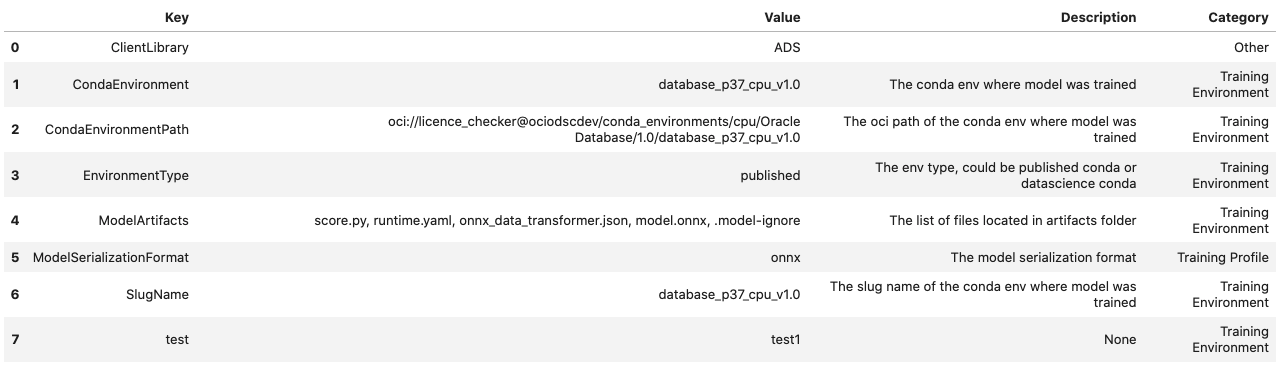
Alternatively, you can view the custom metadata in YAML format by calling .metadata_custom:
sklearn_model.metadata_custom
data:
- category: Training Environment
  description: The conda env where model was trained
  key: CondaEnvironment
  value: database_p37_cpu_v1.0
- category: Training Environment
  description: null
  key: test
  value: test1
- category: Training Environment
  description: The env type, could be published conda or datascience conda
  key: EnvironmentType
  value: published
- category: Training Environment
  description: The list of files located in artifacts folder
  key: ModelArtifacts
  value: score.py, runtime.yaml, onnx_data_transformer.json, model.onnx, .model-ignore
- category: Training Environment
  description: The slug name of the conda env where model was trained
  key: SlugName
  value: database_p37_cpu_v1.0
- category: Training Environment
  description: The oci path of the conda env where model was trained
  key: CondaEnvironmentPath
  value: oci://licence_checker@ociodscdev/conda_environments/cpu/Oracle Database/1.0/database_p37_cpu_v1.0
- category: Other
  description: ''
  key: ClientLibrary
  value: ADS
- category: Training Profile
  description: The model serialization format
  key: ModelSerializationFormat
  value: onnx
When the combined total size of metadata_custom and metadata_taxonomy exceeds 32000 bytes, an error occurs when you save the model to the model catalog. You can save the metadata_custom and metadata_taxonomy to the artifacts folder:
sklearn_model.metadata_custom.to_json_file(path_to_ADS_model_artifact)
You can also save individual items from the custom and taxonomy metadata:
sklearn_model.metadata_taxonomy['Hyperparameters'].to_json_file(path_to_ADS_model_artifact)
If you already have the training or validation dataset saved in Object Storage and want to document this information in this model artifact object, you can add that information into metadata_custom:
sklearn_model.metadata_custom.set_training_data(path='oci://bucket_name@namespace/train_data_filename', data_size='(200,100)')
sklearn_model.metadata_custom.set_validation_data(path='oci://bucket_name@namespace/validation_data_filename', data_size='(100,100)')